Why Creators Need to Edit YouTube Videos Faster
The YouTube algorithm heavily prioritizes audience retention and average percentage viewed. If a viewer clicks away within the first thirty seconds due to a slow, hesitation-filled introduction, the video's reach is compromised.
To maintain high retention, top YouTube channels craft rapid pacing using dynamic jump cuts. However, manual jump cutting is a grueling process. An editor must play through raw camera files, zoom in on the timeline, make two razor cuts for every pause, ripple delete the silence, and repeat this process hundreds of times across each video upload.
Across an unedited thirty-minute talking-head recording, manual A-roll cutting typically consumes two to three hours. Automating this initial rough cut step allows creators to redirect their energy toward thumbnail design, visual storytelling, B-roll overlays, and sound design.
Zero Cloud Uploads: Edit Directly on Your Mac
Many modern editing tools require uploading multi-gigabyte video files to cloud servers. For creators recording 4K footage from mirrorless cameras, waiting for dozens of gigabytes to upload slows down the entire release schedule. Furthermore, web-based tools often lock advanced editing behind recurring subscriptions and metered AI credit limits.
Cut Video Gaps works locally. Utilizing bundled Whisper speech recognition and FFmpeg binaries, all audio decoding, speech analysis, and timeline processing run directly on your Mac. Your video and audio recordings never leave your Mac, with zero cloud AI API calls and no token consumption. A lightweight online check verifies user authentication and tracks monthly beta hours, while raw video stays safely on your local drive.
Learn more about our local model in why local processing protects your video.
Two Detection Engines for Talking-Head Videos
Depending on your studio setup and audio equipment, Cut Video Gaps provides two detection modes:
- Fast Cut: Leverages FFmpeg amplitude detection to instantly isolate sections that fall below a set decibel volume threshold. It is ideal for quiet home studios or treated rooms using directional dynamic microphones.
- AI Auto Cut: Runs on-device Whisper neural speech recognition to locate speech syllables. If your studio has background computer fan hum, street traffic rumble, or mechanical keyboard clicks, Whisper ignores the noise and cuts strictly when speech stops.
Compare both modes in detail in our guide on Fast Cut vs AI Auto Cut.
Interactive Visual Timeline: Preserve Comedic Rhythm
Great YouTube videos rely on timing. A deadpan pause after a dry remark or a brief pause before revealing a visual punchline shouldn't be blindly excised by a robotic filter.
Cut Video Gaps features an interactive visual timeline. Every detected silence gap is highlighted, giving you complete freedom to inspect cuts, audition transitions, drag boundary edges, or delete individual cuts with one click. You retain total creative authority over the pacing of your narrative.
Seamless Integration with Final Cut Pro
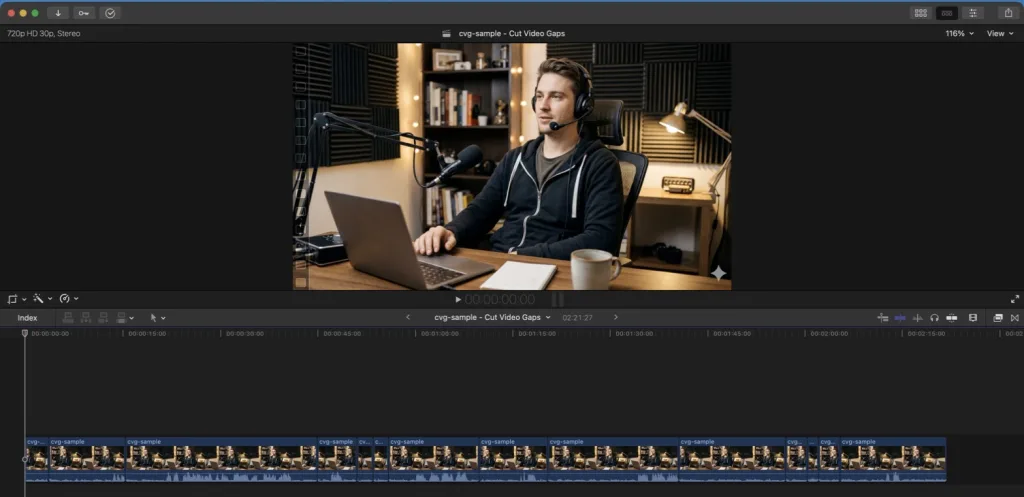
After fine-tuning cuts on the timeline, export your project as a Final Cut Pro XML (FCPXML) sequence. When opened inside Final Cut Pro, your original source files appear on the primary timeline with all pauses cleanly removed as non-destructive edits. You can immediately begin applying titles, zoom transitions, sound effects, and color grades. Editing in Premiere Pro or After Effects instead? Export a Premiere Pro XML project or an After Effects script; both point at your original media with no re-encode.
Read our step-by-step tutorial on removing silence in Final Cut Pro automatically.
One Verified Benchmark Session
The efficiency benefits are clear in testing: in one Punjabi-language sample session recorded with dialogue, a raw file of 01:38 resulted in 11 cuts, removing 54 seconds of dead air to produce a finished 00:43 cut. This sample session shows how quickly raw takes can be condensed into high-retention video.