Everything Cut Video Gaps Does
A complete breakdown of our on-device silence detection engines, speech-aware editing, non-destructive NLE timeline exports, and platform compatibility.
Two Detection Engines Built for Different Needs
Choose between instant waveform threshold analysis or deep speech transcription. New in version 1.1.0: pick the mode for each file after opening it, with a time estimate for your video, or let the app remember your choice.
Speech-Aware Word Boundary Protection
Uses OpenAI's Whisper model running locally on your hardware. Transcribes speech down to individual word start and end times so soft endings, trailing consonants, and quiet speech are never clipped.
- Protects quiet speech: Distinguishes whispering from dead air.
- Filler word removal: Automatically cuts "um", "uh", and repetitive stutters.
- Speech-aware bad takes: Flags repeated restarts and keeps the best final take.
- Zero cloud delay: Whisper model is bundled directly in the app.
Instant Volume-Threshold Scanning
A pure decibel volume-threshold pass using local FFmpeg. Scans audio waveforms at lightning speed, ideal for clean, acoustically-treated studio recordings where speed is priority.
- Instantaneous: Processes an hour of video in under 30 seconds.
- Adjustable dB Floor: Fine-tune sensitivity from -20 dB to -50 dB.
- Custom pause duration: Define minimum pause length (e.g. 0.4s to 1.5s).
- Adjustable cut padding: Adds lead-in and lead-out margins for natural breath.
Platform Compatibility Matrix
Apple Silicon is supported today; a Windows version is in development and Intel Mac support is planned.
Apple Silicon Mac
Windows 10 & 11 PC
Intel Mac (x86_64)
Seamless Non-Destructive Timeline Exports
Never re-encode your footage. Cut Video Gaps creates project timelines referencing your original source media with exact frame accuracy.
Final Cut Pro (FCPXML)
Exports standard FCPXML 1.10. Imports straight into Final Cut Pro with magnetic timeline clips and stereo audio matching your original frame rate.
View FCP workflow guide →Adobe Premiere Pro (XML)
Creates an industry-standard Premiere XML project. Simply choose File > Import to populate your project bin with trimmed, synced rough-cut sequences.
New in version 1.0.9After Effects (.jsx Script)
Generates an automated ExtendScript (.jsx) file. Open After Effects, run the script, and an edited composition is built automatically on your timeline.
New in version 1.0.9Visual Timeline & Labelled Cut Management
Maintain full editorial control before exporting. You always decide what stays and what goes.
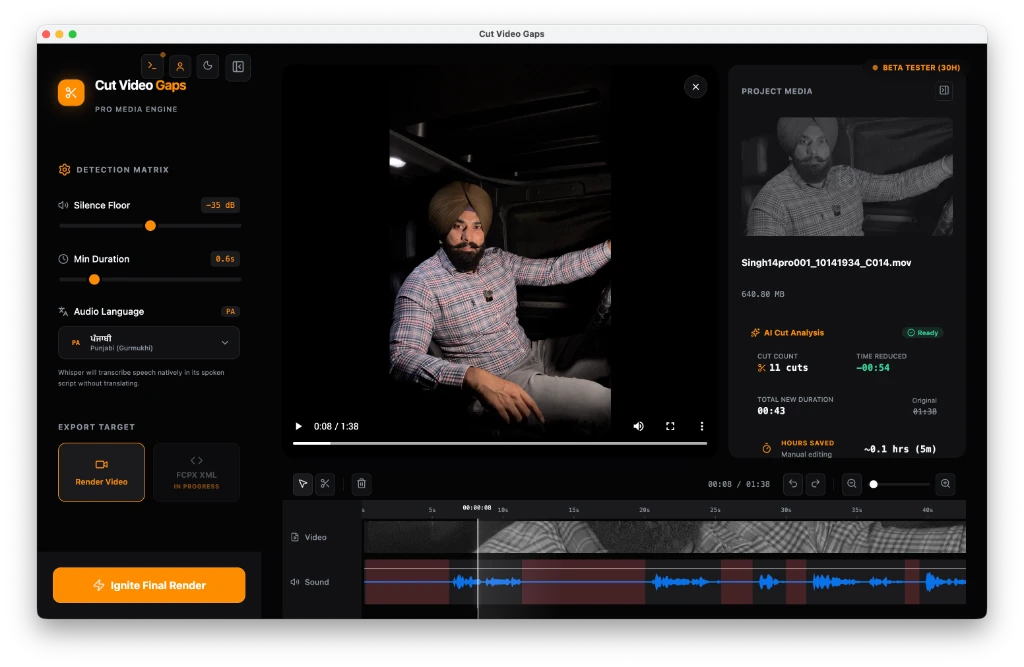
Unlike destructive silence cutters that blindly export a chopped video file, Cut Video Gaps displays a magnetic-style visual timeline before you make a single export.
- Silence cuts: Measured pauses and room tone gaps with millisecond accuracy.
- Filler words: Pauses containing hesitations like "um", "uh", and throat clearing.
- Repeats & Stutters: Unintended word repetitions like "I I think".
- Speech-aware bad takes: False starts where you restart the sentence.
- Stray words: Off-topic trailing speech before starting or after completing a take.
Click any cut to preview the exact audio or delete it to preserve the pause. You can also toggle entire categories on or off with a single click.
New in version 1.1.0: zoom like Final Cut (⌘+ / ⌘−, pinch, or ⇧Z to fit) down to about two seconds on any video length, with a waveform that stays sharp. Cut edges snap to whole frames when you drag them.
Tested Across Global and Regional Languages
Whisper automatically identifies spoken dialogue. We have verified performance on real-world footage.
Full support for US, UK, Canadian, Australian, and Indian English accents with comprehensive filler detection.
Recognizes Hindi conversational tempo, natural sentence stops, and bilingual Hinglish talking-head recordings.
Accurately detects Punjabi speech pauses, repeated hesitations, and common regional filler expressions.
Bad-take detection and pause isolation verified for conversational Urdu dialogue and interview formats.
Need Windows or Intel Mac Support?
A native Windows 10/11 desktop build is in development and Intel Mac support is planned. Enter your email below to receive an invitation the moment beta slots open.
Download the Free Mac Beta Today
Available now for Apple Silicon Macs running macOS 13+. Enjoy 15 free hours/month with zero video uploads or cloud AI bills.
Related Video Editing Guides
How to Remove Silence from a Video on Mac (No Uploads)
The complete guide to local silence removal without cloud uploads or AI tokens.
Silence Threshold dB: Which Setting to Use
A settings table by recording type and a 5-second noise floor test.
FFmpeg silencedetect vs Whisper Speech Recognition
A technical deep dive comparing DSP amplitude detection with neural sequence models.