The Nuances of a Dedicated Hindi Video Silence Remover
Hindi video content is booming worldwide, spanning YouTube commentary, educational lectures, technical programming tutorials, podcast discussions, and narrative interviews. However, editors cutting Hindi footage often run into frustration with traditional decibel-only audio gate utilities.
Spoken Hindi has unique grammatical cadences. Sentences often feature auxiliary verbs, compound tense endings, conversational fillers (such as "matlab" or "toh fir"), and thoughtful pauses between clauses. If an editing tool relies solely on volume thresholds, it easily clips softly spoken initial consonants or truncates nasalized endings before the speaker finishes their thought.
Cut Video Gaps provides a speech-aware alternative through AI Auto Cut mode. By bundling OpenAI's open-source Whisper model inside a local Mac application, the software recognizes spoken Hindi words to identify genuine pauses between thoughts rather than cutting off quiet syllables.
Realistic Performance Expectations: Audio Quality Matters
We believe in complete honesty regarding machine learning capabilities. While Whisper provides confirmed support for Hindi, accuracy depends heavily on audio recording quality, background room acoustics, microphone proximity, and speaker clarity. Results vary significantly between different filming environments:
- Clean Microphone Recordings: Lav or podcast microphone tracks with minimal room echo yield the cleanest gap detection and phrase separation.
- Mixed Language (Hinglish): Fast code-switching between Hindi and English phrases can sometimes impact transcription confidence, meaning editors should always inspect cut markers on the timeline.
- Noisy Backgrounds: Heavy background chatter, street traffic, or ceiling fan hum can obscure word boundaries, requiring manual padding adjustments.
Because no automated model is infallible, Cut Video Gaps never forces destructive cuts onto your media. Every detected silence gap appears on an interactive visual timeline where you can review, drag boundary handles, or delete cuts before exporting.
Fast Cut vs AI Auto Cut for Hindi Audio
Cut Video Gaps provides two distinct processing engines:
- AI Auto Cut (Whisper): Recommended for conversational Hindi speech, interviews, and presentations where preserving grammatical integrity and breathing pauses is essential.
- Fast Cut (FFmpeg): A high-speed decibel-threshold mode that processes purely based on audio amplitude. Ideal for screencasts or studio audio where the speaker maintains strong, consistent vocal projection. Learn more in our Fast Cut vs AI Auto Cut comparison.
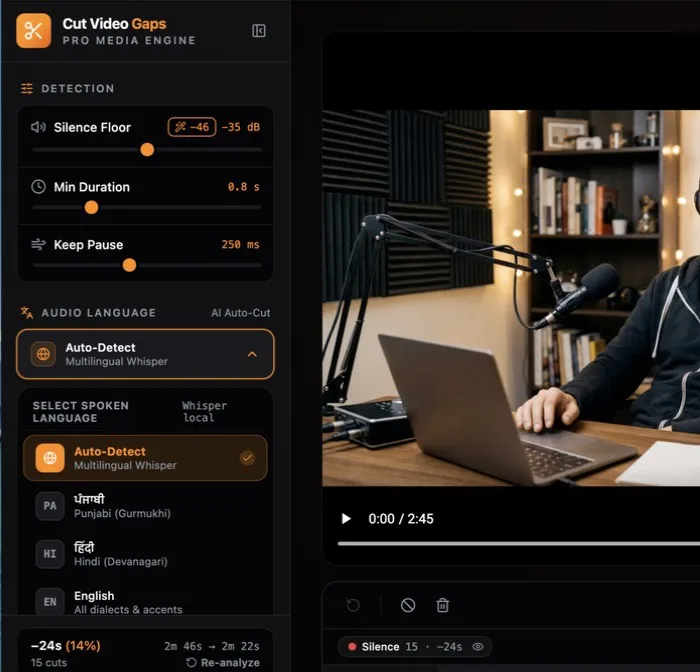
Verified Sample Session Benchmark
Here is the verified data from one sample session tested by the creator. That clip was recorded in Punjabi; a Hindi-specific benchmark has not been published yet.
Metrics from one sample session. Speech pacing and audio conditions will determine specific cut counts on your footage.
Recommended Audio Setup for Hindi Dialogue
To achieve the highest gap detection fidelity when working with spoken Hindi recordings, consider the following production practices during filming:
- Microphone Placement: Position a directional shotgun or close-proximity lavalier microphone within six to twelve inches of the speaker to maximize vocal isolation against room reverberation.
- Input Gain Management: Avoid over-amplifying low dialogue signals. Setting clear baseline levels ensures that subtle vocal inflections register well above the background noise floor.
- Supported Media Inputs: You can import standard camera video files in MP4, MOV, or MKV containers, or bring in separate audio recordings (such as WAV or M4A) captured on external sound recorders.
When importing combined camera tracks, Cut Video Gaps automatically parses the primary audio stream locally using bundled FFmpeg before passing audio buffers to Whisper for speech transcription.
Zero Media Uploads & Timeline Exports
Regional video creators in India and globally often work with high-capacity 4K camera footage. Uploading multi-gigabyte video files to cloud web editors consumes massive bandwidth and wastes hours of editing time. With Cut Video Gaps, processing runs directly on your Mac using on-device Whisper and FFmpeg. Video and audio recordings are never uploaded. A small account and quota check exists only to verify license status.
Export options include:
- Final Cut Pro XML (FCPXML): Opens immediately in Final Cut Pro with all trimmed clips arranged non-destructively on your timeline. See our Final Cut Pro silence removal guide.
- Premiere Pro XML (new in 1.0.9): An XML project you bring in with File › Import. Clips point at your original media: no re-encode, frame-accurate, source timecode kept.
- After Effects script (new in 1.0.9): A .jsx script that builds the cut composition from your original media when you run it with File › Scripts › Run Script File.
- Trimmed video file: Produces a video file with dead air removed, keeping the original container where possible (MP4, MOV, M4V or MKV; formats such as WebM export as MP4), ready to share or import into other editors.
- Clean audio: Audio-only files (WAV, MP3, M4A, AAC, FLAC, AIFF) export as a trimmed audio file.
Also explore our Punjabi video silence remover guide or read about why local processing protects your footage.