Why a Dedicated Punjabi Video Editing Tool Matters
Punjabi creators lead thriving YouTube channels, regional news broadcasts, cultural podcasts, music interview shows, and educational academies across Punjab, Canada, the UK, the United States, and Australia. However, editors working with spoken Punjabi frequently face unique challenges when attempting to use automated editing tools designed primarily for standard English.
Spoken Punjabi is rich in tonal distinctions, rhythmic emphasis, conversational connectors (such as "veere", "hanji", "acha", and "fer"), and expressive pauses that add emotional resonance to storytelling. Conventional noise gate software that relies purely on decibel volume thresholds often chops off softly spoken sentence openers or trims natural breath pauses that give Punjabi speech its authentic cadence.
Cut Video Gaps approaches Punjabi dialogue through AI Auto Cut mode. Bundling OpenAI's open-source Whisper speech model into a local Mac application, the software analyzes spoken words to understand where sentences actually conclude before suggesting cut boundaries.
Honest Assessment: Accuracy and Audio Quality Variables
We believe in straightforward facts: machine learning speech models do not deliver identical accuracy across all recording conditions. In Cut Video Gaps, Whisper provides confirmed testing for Punjabi, but results vary based on audio fidelity, microphone quality, and dialectal variations:
- Dialects and Accents: Standard Majhi speech recorded in quiet studio conditions yields clean phrase separation. Regional slang, rapid colloquial banter, or heavy code-switching with English requires visual inspection of the cut boundaries.
- Microphone Distance: Echoey room acoustics or camera-top shotgun microphones from far away introduce background reverb that can blur word boundaries.
- Background Music and Noise: If background Punjabi folk instrumentation or outdoor environmental sounds are present in the raw audio track, accuracy decreases compared to clean dry vocal recordings.
Because results can vary, Cut Video Gaps includes an interactive visual timeline. You are never locked into automated cuts; every gap can be reviewed, boundary padding can be resized, and any cut can be deleted before saving.
Two Processing Engines: Fast Cut vs AI Auto Cut
Depending on your editing priorities, you can switch between two dedicated modes:
- AI Auto Cut (Whisper): Best for nuanced conversational Punjabi speech, vlogs, and narrative interviews where retaining natural cadence without aggressive consonant clipping is essential.
- Fast Cut (FFmpeg): A high-speed decibel-threshold mode that rapidly detects silence based on volume levels alone. Great for clean isolated studio voiceovers where rapid turnaround is the priority. Read our Fast Cut vs AI Auto Cut guide for side-by-side details.
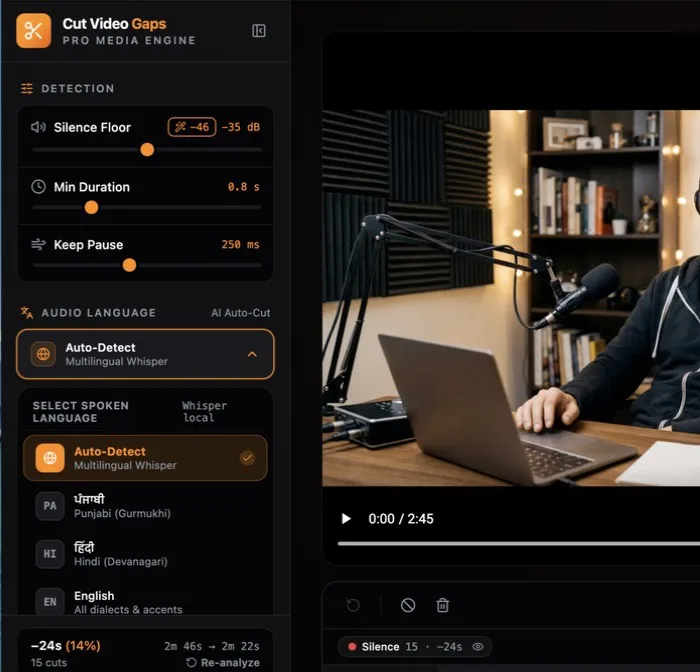
Verified Sample Session Benchmark
Here is the verified benchmark from one sample session conducted by the creator, recorded in Punjabi:
Data from one sample session. The exact amount of dead air removed depends on speaker presentation style and pause frequency.
Audio Recording Tips for Best Results in Punjabi
To get the most reliable cut boundaries when processing spoken Punjabi video:
- Use a Dedicated Vocal Microphone: A dynamic broadcast microphone or high-quality lavalier helps isolate vocal frequencies from ambient room reflections.
- Record Room Tone: Leaving two seconds of quiet room tone at the start helps establish a clean baseline noise floor for waveform analysis.
- Check Audio Tracks: Ensure your camera or external recorder captures unclipped audio without digital distortion on loud enthusiastic phrases.
Supported file formats include MP4, MOV, and MKV containers, as well as separate audio stems.
Zero Cloud Uploads & Timeline Export Options
Because Cut Video Gaps runs locally on your Mac, there is zero waiting for multi-gigabyte video uploads over slow connections. Your video and audio recordings never leave your Mac. The software verifies account status and tracks your monthly quota through a small online check.
Export options:
- Final Cut Pro XML (FCPXML): Exports an XML timeline that opens instantly in Final Cut Pro, with all cuts non-destructively positioned so you can roll edit transitions. See our Final Cut Pro silence removal guide.
- Premiere Pro XML (new in 1.0.9): An XML project you bring in with File › Import. Clips point at your original media: no re-encode, frame-accurate, source timecode kept.
- After Effects script (new in 1.0.9): A .jsx script that builds the cut composition from your original media when you run it with File › Scripts › Run Script File.
- Trimmed video file: Exports a silence-trimmed copy via local FFmpeg, keeping the original container where possible (MP4, MOV, M4V or MKV; formats such as WebM export as MP4).
- Clean audio: Audio-only files (WAV, MP3, M4A, AAC, FLAC, AIFF) export as a trimmed audio file.
See also our Hindi silence removal guide or learn how Cut Video Gaps detects and cuts dead air.